Connect your conversations. Strengthen your workflow.
Bring meetings, customer context and in-person recordings into one improvement loop. For Enterprise teams, connect SalesLens to your CRM with an integration built around the way you work.
Your CRM. Your process.Custom integration for Enterprise
Connection options are confirmed for your tools and agreed scope.
START WHERE YOUR TEAM WORKS
Different sources. One connected view.
CALENDAR & ONLINE MEETINGS
Your calendar. Your capture rules.
Connect your calendar, choose which meetings SalesLens should join and customise your meeting bot. Bring the recording into meeting analysis, qualification and coaching.
Bring relevant customer emails alongside meeting history. Review contact and company matches so the next conversation starts with useful context. Confirm mailbox support and permissions for your rollout.
Discuss a recording workflow for your dialler or contact centre. We review provider access, recording formats and employee matching, then connect the agreed workflow to cold-calling or customer-service playbooks.
Capture customer visits, store consultations and showroom conversations. Smart ID brings in-person recordings into the same analysis and coaching workflow, with hardware and setup quoted separately.
Your CRM holds the relationship. SalesLens helps explain the conversations behind it. We can build a custom connection so your team can use that evidence within its existing sales process.
Customer & contact matching
Map accounts, contacts and ownership so meeting evidence is associated with the right relationship.
Meeting insights in your CRM
Scope the summaries, qualification signals and source links your team needs inside its existing CRM workflow.
Follow-up & opportunity workflows
Agree which next steps, tasks or opportunity fields should transfer, and where a person reviews changes.
Control the data exchange
Define permissions, sync direction, required fields and error handling before rollout.
Built to an agreed scope: CRM compatibility, API access, field mapping, sync direction and implementation are reviewed with your team. Custom CRM work is scoped and quoted as part of your Enterprise proposal.
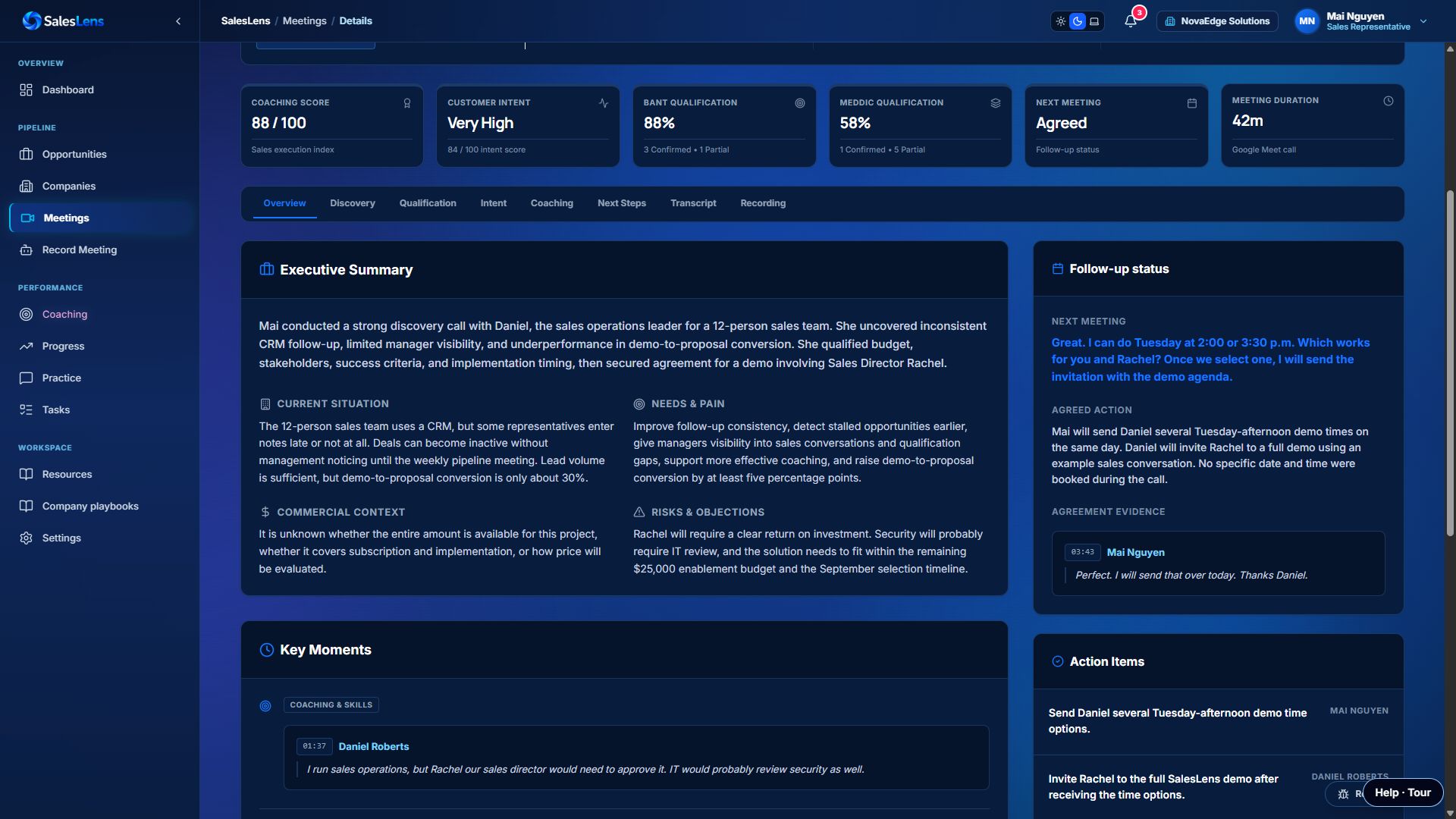
Review the executive summary, customer needs, intent, qualification and agreed follow-up in one meeting view.Actual app screen · Demo account. Example data illustrates the workflow, not results for this industry.
Your integration questions, answered.
Can SalesLens integrate with our CRM?
Yes. Custom CRM integration is available for Enterprise clients. We assess your CRM API, access requirements and desired workflow, then agree the scope and pricing.
What can a CRM integration include?
Depending on your system and agreed scope, it can include account and contact matching, meeting summaries, evidence links, tasks and opportunity updates. Sync direction and review rules are defined during scoping.
Is Smart ID included in the platform price?
Smart ID hardware is priced separately. Contact us to discuss devices, employee assignment and your recording workflow.
How do we check a dialler or another system?
Share the provider and the workflow you want to connect. We review API or recording access, identity mapping and technical requirements before proposing an integration.
Build the connection your team needs.
Tell us which tools you use and what you want to improve. We’ll help define the right workflow and integration scope.